OFFICIAL DOCUMENTATION · FREE & PRO V1.2
Cadyra Privacy & Audit for MCP – Manual
Step-by-step guide to installation, MCP client setup (Claude Desktop, Cursor, n8n), PII redaction & PrivacyVault, gateway quarantine, 72h rollbacks, and self-service troubleshooting — complete with screenshots.
Quickstart: Install & Connect Your First AI Agent
Cadyra runs locally on your own WordPress server between external AI clients (Claude Desktop, Cursor, ChatGPT, n8n, or custom runners) and WordPress — with zero cloud relay.
Prerequisites
WordPress 6.9+, PHP 8.2+, HTTPS, and the official MCP Adapter plugin (mcp-adapter) active.
Install Free Core
Install and activate cadyra-privacy-and-audit-for-mcp under Plugins → Add New. Baseline guards start immediately.
Activate PRO (Optional)
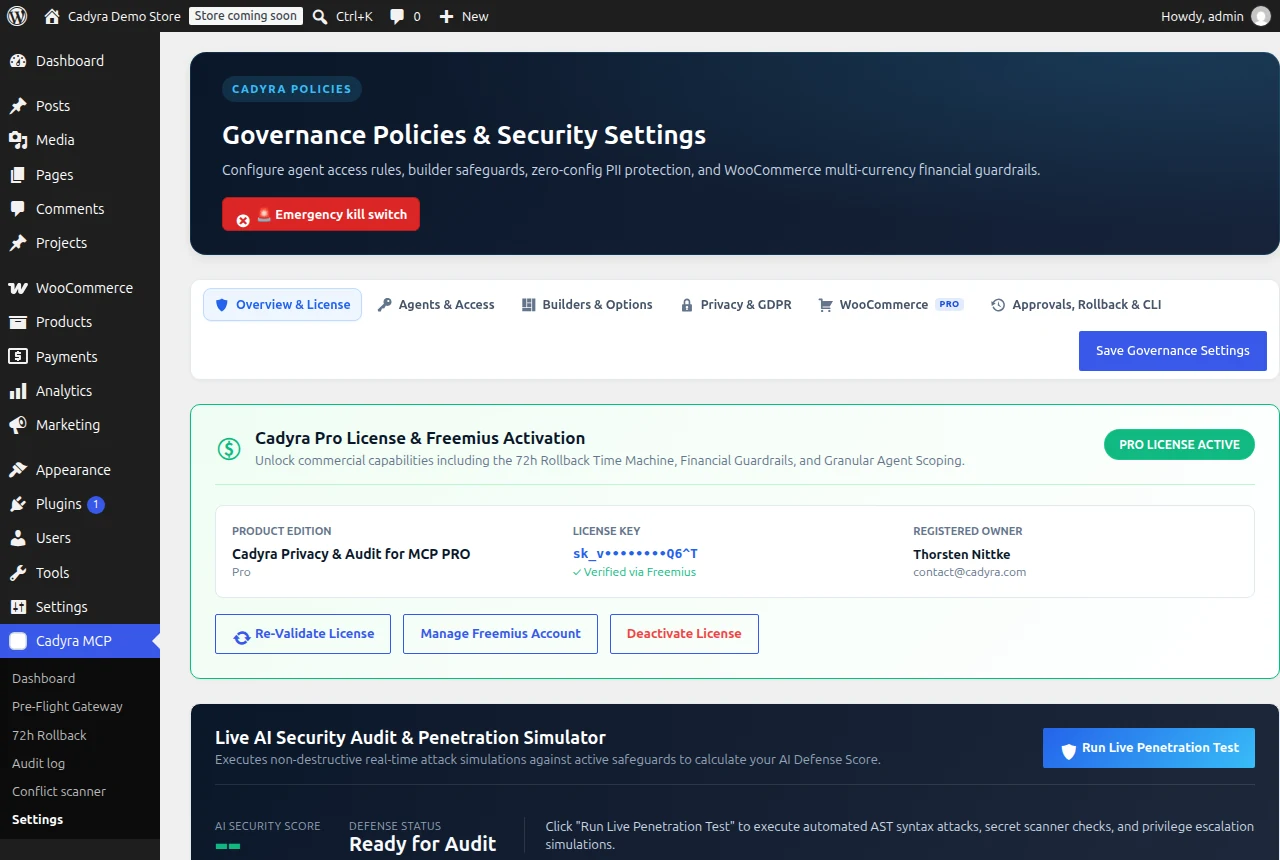
Upload cadyra-privacy-and-audit-for-mcp-pro.zip and enter your Freemius key under Cadyra MCP → Dashboard.
Create Agent Credential
Create, disable, renew, or delete dedicated AI Application Passwords directly under Cadyra MCP → Settings.
Endpoint: https://your-domain.com/wp-json/mcp/mcp-adapter-default-server
Header: Authorization: Basic <base64(wp_username:app_password)>
Protocol: MCP-Protocol-Version: 2025-11-25
cadyra-privacy-and-audit-for-mcp-pro) via WordPress hooks.| Area | Free Core Free · $0 | PRO Add-on PRO |
|---|---|---|
| Core Security Firewalls | Free Gateway Quarantine, Kill-Switch (503), Loop Breaker (429), Options Guard, Privilege Guard, Media/SVG/SSRF Firewall, Prompt Injection Guard (OWASP LLM01), Secret Protector, Draft Sandbox, Ability Matrix & Self-Test | Included in Core + PRO Granular Per-Agent Scoping (role profiles, CRUD switches, post-type filters, page ID allow/denylists) |
| Privacy & PII | Free Unrestricted one-way redaction ([REDACTED]) across all MCP responses, cadyra/scrub-text, /cadyra/v1/scrub, Prompt Sanitizer & Editor Preflight (emails, 6-region phones, IPv4/IPv6, seed_names) |
PRO Reversible AES-256-GCM PrivacyVault ({{CADYRA_VAR_*}}), 6-region business & national IDs, structured shop fields, Strict Lock (403), Approval (202), Write-Corruption (409), Publication Guard (403) & alerts |
| Builders, Rollback & Shop | Free Gutenberg block-balance & Stored-XSS validator + Editor Preflight button (Gutenberg, Elementor & Divi) | PRO Divi 5/4 & Elementor AST + 3 MCP design abilities, 72h Rollback Time Machine, WooCommerce Multi-Currency Financial Guard, Human-in-the-Loop Approval Gates & signed compliance evidence |
| MCP Abilities | 2 Free cadyra/get-system-conflicts, cadyra/scrub-text |
+6 PRO cadyra/tokenize-sensitive-data, cadyra/get-transaction-status, cadyra/get-approval-status, cadyra/get-site-design-brief, cadyra/get-builder-schema, cadyra/compose-builder-page |
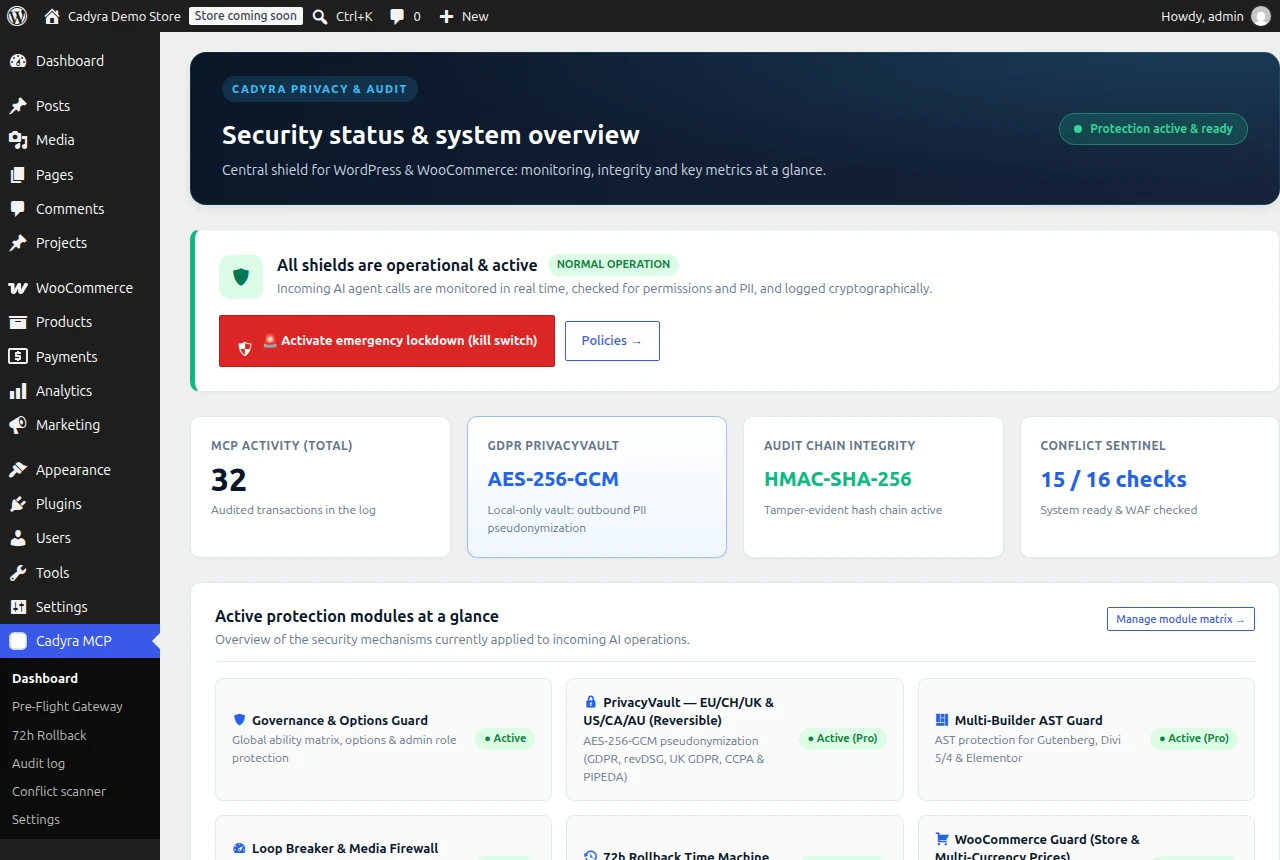
Dashboard, Security Self-Test & Emergency Kill-Switch (Free)
Under Cadyra MCP → Dashboard, inspect audited MCP transactions, active PII protection mode, audit chain status, and all active guard modules at a glance.
- Free Emergency Lockdown (Kill-Switch, EU AI Act Art. 14): One click immediately suspends all MCP and AI agent requests with HTTP
503(or enforce permanently viaCADYRA_MCP_EMERGENCY_LOCKDOWNinwp-config.php). - Free Built-in Security Self-Test: Verifies gateway isolation, options protection, loop breaker, audit chain integrity, and PII redaction (plus PrivacyVault when PRO is active) in seconds.
- PRO Approval Queue Widget & License Status: Displays pending Human-in-the-Loop approvals directly on the dashboard and manages your Freemius license key.
PII Protection: One-Way Redaction (Free) vs. AES-256-GCM PrivacyVault (PRO)
Before WordPress responses leave your server toward an external LLM, Cadyra inspects payloads, HTTP headers, and error messages locally for personal data and credentials.
| Scope | Free Core Free | Cadyra PRO PRO |
|---|---|---|
| Covered Surfaces | Free Unrestricted across all MCP responses, cadyra/scrub-text, POST /wp-json/cadyra/v1/scrub, interactive Prompt Sanitizer & Editor Preflight (Gutenberg, Elementor, Divi) |
PRO Adds structured WooCommerce order, customer & user profile fields, UserNameSeeder, cadyra/tokenize-sensitive-data, plus /cadyra/v1/tokenize & /detokenize (browser admin only) |
| Method & Policies | Free Permanent one-way redaction ([EMAIL_REDACTED], [PHONE_REDACTED], [IP_REDACTED]) |
PRO Reversible AES-256-GCM PrivacyVault ({{CADYRA_VAR_EMAIL_...}}) with local inbound de-tokenization, Write-Corruption Guard (409), Publication Guard (403), Strict Lock (403), PII Approval (202) & email/webhook alerts |
| Detectors | Free Emails, phone numbers (EU/DACH, FR, CH, UK, US/CA NANP, AU & +CC), IPv4/IPv6, seed_names & API secrets |
PRO Street addresses & postcodes/ZIP+4, personal names, dates of birth, EU IBAN (Mod-97), payment cards (Luhn), DE Tax ID/SVNR, CH AHV, UK NINO/UTR, US SSN/EIN, CA SIN/BN, AU TFN & GDPR Art. 17 crypto-shredding |
Gateway Quarantine (Free), Direct REST API & Agent Scoping (PRO)
Free By default, Gateway Quarantine (cadyra_isolate_agent_app_passwords) confines AI agent credentials strictly to /wp-json/mcp/* and /wp-json/wp-abilities/*. Direct calls to /wp-json/wp/v2/* or XML-RPC are rejected with HTTP 403 and logged.
- Free Direct REST API without MCP: Keep the password classified as an Agent and simply turn off Gateway Quarantine in Settings. Kill-switch, anti-tamper, audit logging, PII scrubbing, sandbox staging, and WordPress kernel hooks stay active across direct REST routes (
/wp/v2/*,/wc/v3/*). - Free Full Credential Lifecycle inside Cadyra: Directly from the Agent table, you can Disable / Enable any credential (instant HTTP 403 block across all channels), Renew it (rotates password while preserving scopes & PRO policies), or Delete it permanently.
- PRO Granular Agent Scoping Matrix: Assign per-agent role profiles (Read-Only, Content Writer, SEO Specialist, Shop Manager), CRUD rules, post-type filters, and page ID allow/denylists enforced at both the gateway and WordPress kernel hooks.
Sandbox (Free), 72h Rollback, WooCommerce & Page Builders (PRO)
- Free AI Sandbox & Draft Staging: Forces new AI-authored posts into
draftstatus and intercepts destructive deletes until reviewed. - Free Gutenberg Guard & Editor Preflight: Validates Gutenberg block comments, tag balance & Stored-XSS, and provides the Preflight check button inside Gutenberg, Elementor & Divi editors.
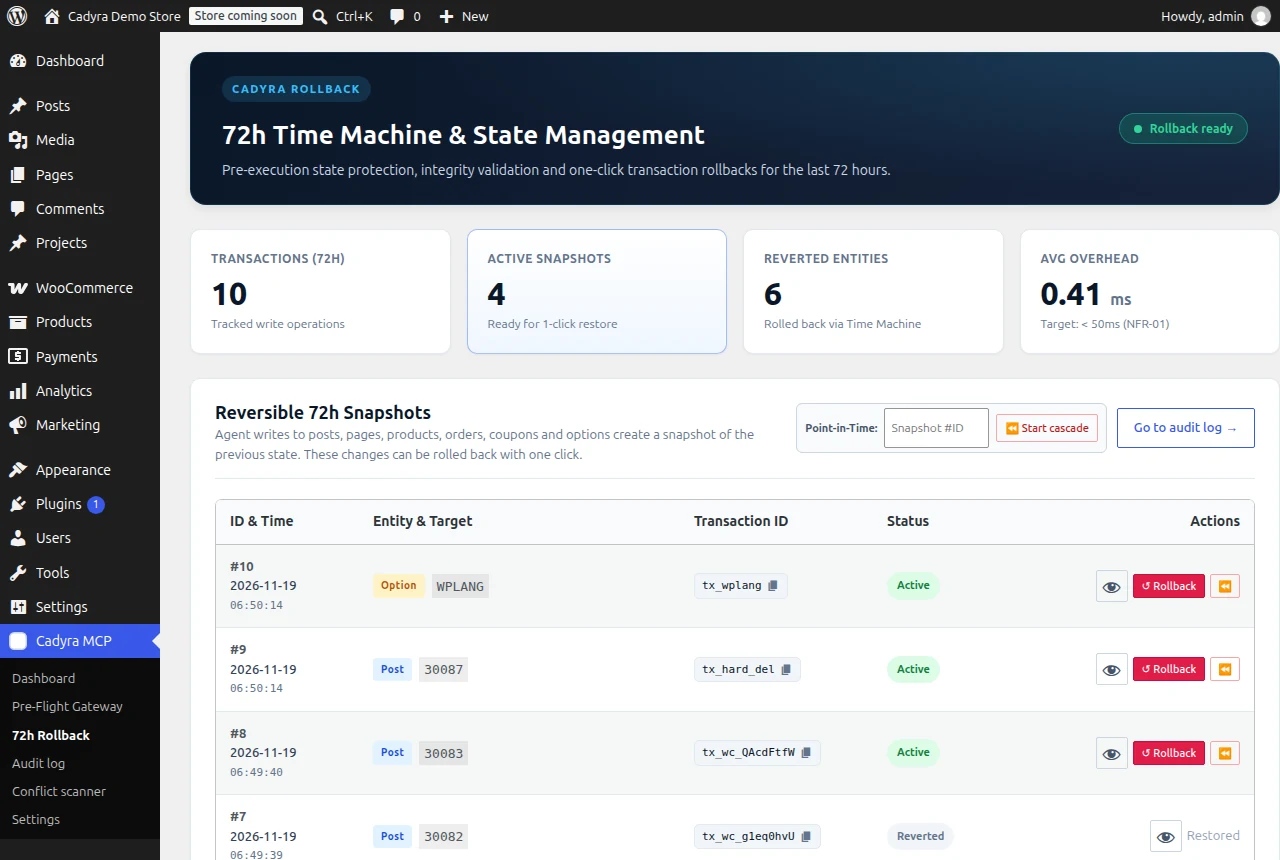
- PRO 72h Rollback Time Machine: Captures a local pre-mutation snapshot before writes to posts, pages, products, orders, coupons, or options with one-click & cascade rollbacks plus
cadyra/get-transaction-status. - PRO WooCommerce Financial Guard: Protects base currency and multi-currency fields (WPML/WCML, CURCY, FOX/WOOCS, Aelia) against zero-price writes, steep price drops, runaway coupons, negative stock, and unapproved refunds.
- PRO Divi 5/4 & Elementor AST Guard + Design Engine: Validates Divi 5 block AST, Divi 4 shortcodes & Elementor JSON plus 3 native MCP design abilities (
get-site-design-brief,get-builder-schema,compose-builder-page).
Audit Log (Free), Evidence Reports (PRO) & WP-CLI
Free Every AI operation is logged locally with timestamp, authenticated credential context, ability name, status, execution latency, and an HMAC-SHA-256 hash (30-day retention, PII filter, CSV/JSON export, WordPress Privacy Exporter/Eraser). PRO adds HMAC-signed Compliance Evidence Reports (JSON/HTML) and GDPR Art. 17 vault crypto-shredding.
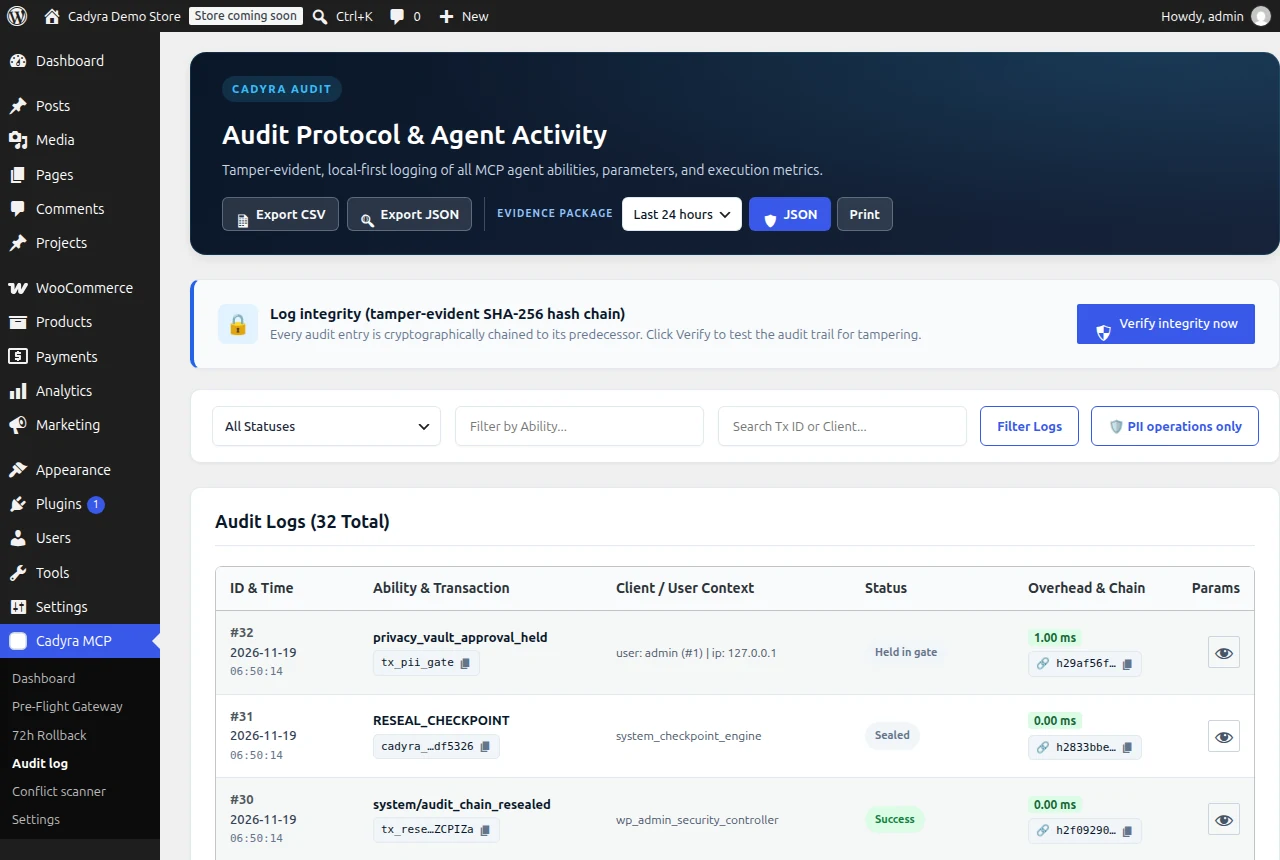
$ wp cadyra status
$ wp cadyra verify-chain
# WP-CLI Commands — PRO Add-on (72h Rollback):
$ wp cadyra snapshots list
$ wp cadyra rollback <snapshot_id>
Pre-Flight Prompt Sanitizer & Conflict Scanner (Free)
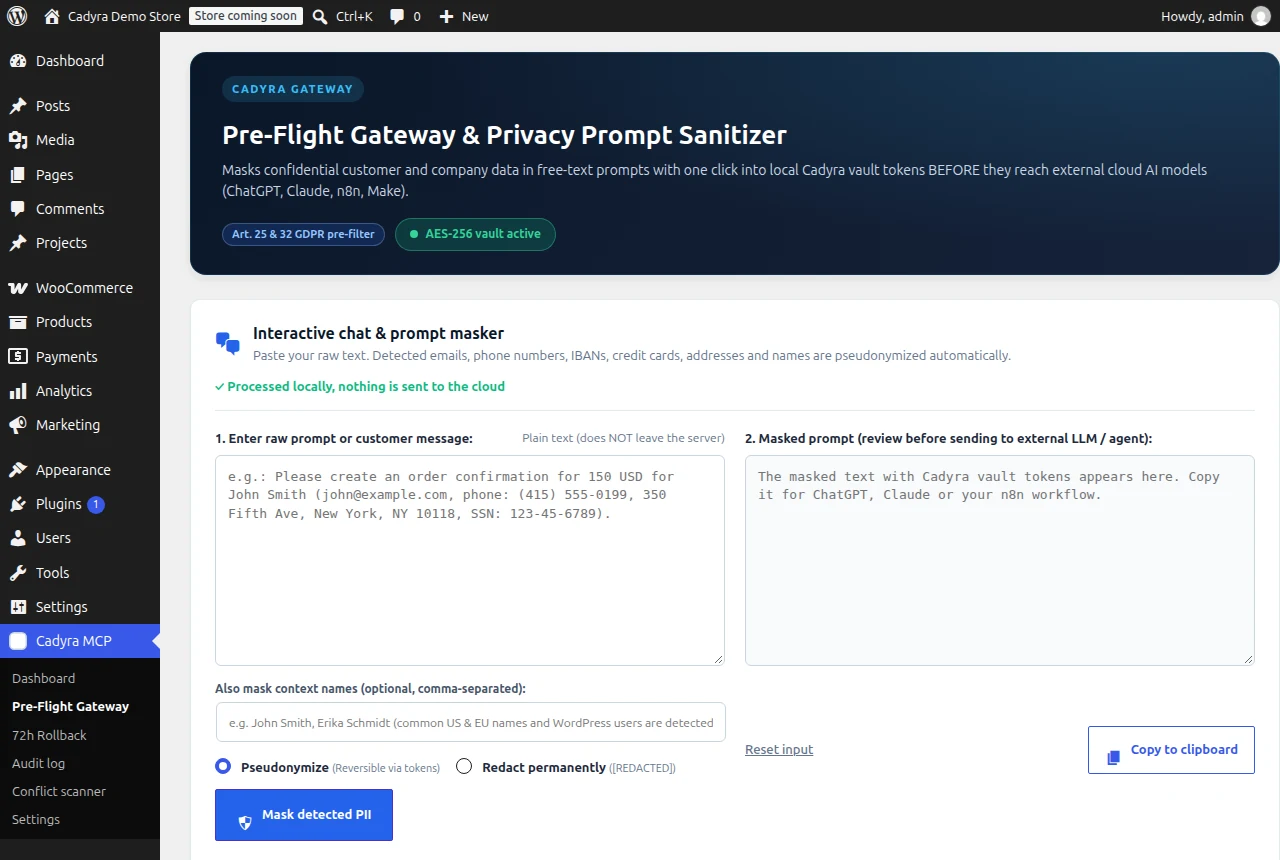
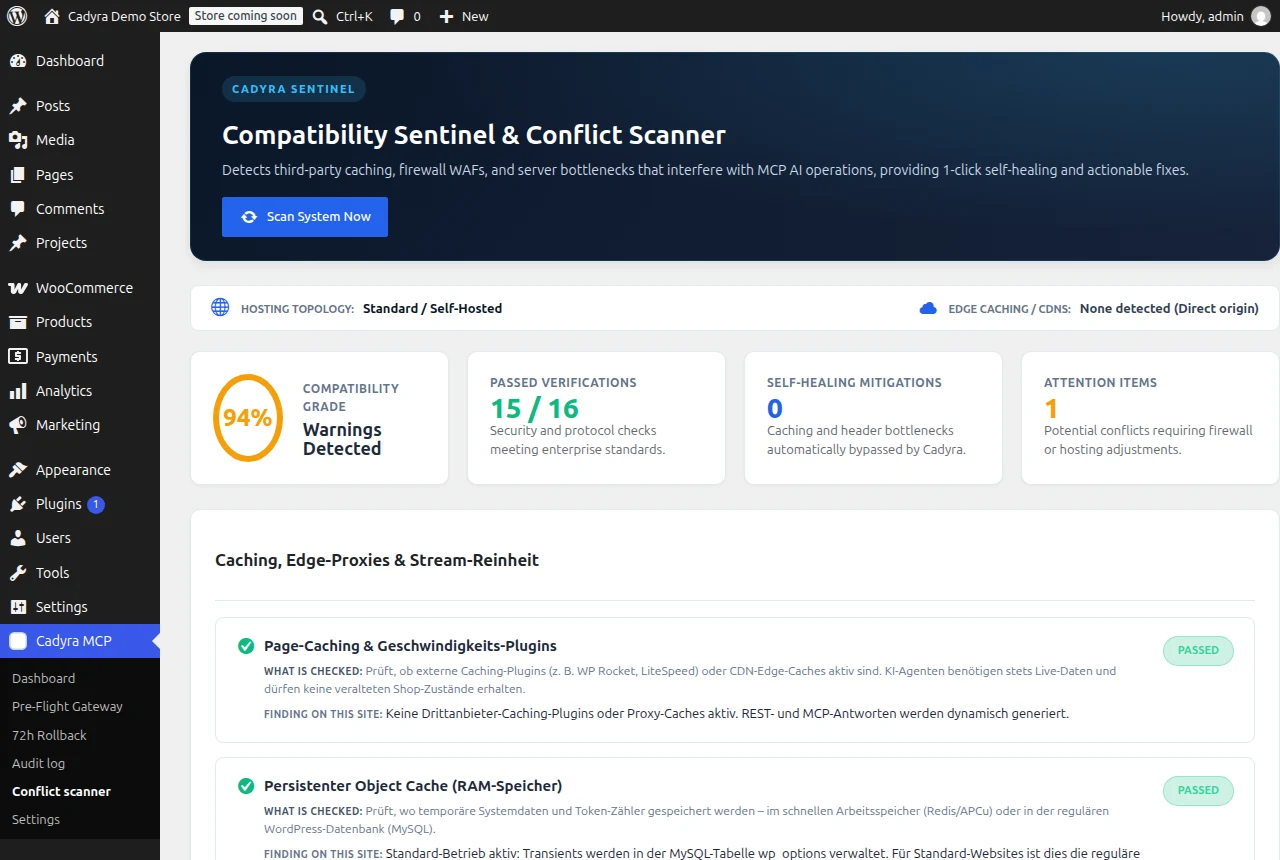
Free The Pre-Flight Gateway (Prompt Sanitizer) lets teams scrub emails, tickets, or text locally (manually, via cadyra/scrub-text, or /wp-json/cadyra/v1/scrub in redact mode; with PRO also reversibly in token mode). The 6-Pillar Conflict Scanner (Free, cadyra/get-system-conflicts) checks caching, WAFs, stripped Authorization headers, JSON cleanliness, and MCP Adapter readiness.
Troubleshooting: Solve Common Issues in Minutes
1. HTTP 401 / Missing Authorization Header
Apache with FastCGI/PHP-FPM often strips the Authorization header. Cadyra automatically checks REDIRECT_HTTP_AUTHORIZATION; on strict hosts add this line to .htaccess:
SetEnvIf Authorization "(.*)" HTTP_AUTHORIZATION=$1
2. HTTP 403 “Gateway Isolation Violation”
Your AI agent credential called a direct Core REST route (e.g. /wp/v2/posts) instead of /wp-json/mcp/....
Fix: Point your client to the MCP endpoint — or turn off Gateway Quarantine in Settings while keeping the credential classified as an agent.
3. HTTP 503 “Emergency Lockdown Active”
The Emergency Kill-Switch is active. Turn it off on the Cadyra Dashboard or remove CADYRA_MCP_EMERGENCY_LOCKDOWN from wp-config.php.
4. Moving a PRO License to a New Domain
Uninstalling the PRO add-on on the old site automatically releases the site activation slot, or manage activations anytime in the Freemius Customer Portal.
5. Staging & Localhost Domains
Standard non-production hosts (localhost, *.local, *.test, staging.*) are recognized automatically by Freemius and never consume a paid slot.
6. Still Need Assistance?
Run the built-in Conflict Scanner first, then email the summary along with your WordPress & PHP versions to support@cadyra.com.